

Summary

Spotify Backstage is a free, open-source framework for building internal developer portals, with a software catalog, templates, TechDocs, and a large plugin ecosystem. It’s a strong fit if you have a dedicated platform team that wants to build and run its own portal. If you want a current catalog, enforced standards, and org-level reporting without maintaining the infrastructure, a managed platform like Cortex is the better fit.
Before anyone called it a developer portal, the answer to “who owns this service?” lived in a spreadsheet, a Confluence page, or the memory of whoever had been around longest. That held up until microservices turned a few dozen systems into a few thousand, and the spreadsheet became a document everyone edited once and nobody trusted again.
Spotify hit that wall early. By 2016 it was growing faster than it could onboard engineers. Its answer started as System Z, an internal registry where teams logged their microservices and the metadata around them, and it grew into Backstage. Spotify open-sourced Backstage in March 2020, right before the world went into lockdown, and it entered the CNCF that September. Within a couple of years, “internal developer portal” was a product category and plenty of companies had a Backstage instance running somewhere.
The portal itself was never the hard part. What takes years is the system underneath: integrations that keep working when vendors change their APIs, ownership that follows people when they switch teams, standards that hold across hundreds of services, and data current enough that an AI agent can act on it. That upkeep is where many Backstage rollouts stall.
This guide gives an overview of Backstage, its key features and drawbacks, and when a managed platform like Cortex makes more sense. As you read, ask yourself how much of your team’s time you want to spend maintaining a portal versus building on top of it.
What is Spotify Backstage?
Spotify Backstage is an open-source framework for building internal developer portals (IDPs): one place where engineers can find services, see who owns them, read their docs, and create new ones from templates. Demand for portals like it grew as microservices, autonomous teams, and tool sprawl made basic questions, like who owns a service and where its docs live, harder to answer.
Core Backstage features
Backstage ships these as building blocks. Each one is a plugin or module your team installs, configures, and maintains, rather than a feature that works the moment you log in.
Backstage Software Catalog
The Backstage Software Catalog is built around metadata YAML files that live alongside your code, which means its accuracy depends on every team keeping their own files current.
Backstage Software Templates
Backstage Software Templates let you define a code skeleton with variables that can be filled in to standardize the creation of new services.
Backstage Search
Backstage Search lets you choose from modular components to build a search tool for your organization, including your software catalog and other sources like a wiki or Stack Overflow.
Backstage TechDocs
Backstage TechDocs allows engineers to write technical documentation as Markdown files that live together with the code, removing friction from the documentation process.
Backstage Kubernetes
Backstage Kubernetes is delivered as a pair of plugins you install and configure. Once wired up, it gives service owners a health-and-status view of the Kubernetes resources behind their services, with drill-down into deployments and pods, so they don't have to live in kubectl.
Backstage AI
Backstage can model AI-related resources in the Software Catalog, expose catalog, template, and search actions to coding assistants like Claude, Cursor, and Copilot through an MCP Actions Backend, and publish skill files that teach those assistants how to perform common Backstage tasks.
Backstage Plugins
As an open-source project, Backstage has a growing number of plugins that can help you customize the platform to your needs.
What engineering problems does Spotify Backstage solve?
Using an IDP like Backstage helps with the following:
Visibility and Discovery: Backstage provides a centralized platform where all services and software components are registered (when teams keep it current), making it easier for developers to discover existing resources.
Documentation and Collaboration: By integrating documentation directly with the development workflow, Backstage ensures that relevant information is easily accessible.
Standardization: Backstage provides templates for creating new services and components, helping ensure consistency in development practices.
The reality of running Backstage
Standing up a developer portal is the easy part. The challenge comes from keeping the foundation true: a catalog that reflects what is running, ownership you can trust, and standards that hold as the system changes. Backstage gives you the framework but leaves that upkeep to your team, which is where the true costs show up. AI raises the stakes: as assistants generate more services and more code, the ownership, standards, and context you have to keep updated accumulate faster than hand-maintained systems can track.
Free to download, expensive to run
The biggest Backstage cost is the team that runs it. Because Backstage is a framework, someone has to build, run, and maintain it: patching plugins, maintaining auth and search, keeping the catalog wired to your tools, and absorbing every upgrade. In practice that means a dedicated team of engineers who are not working on your product.
Canva experienced this challenge first-hand. After a multi-year journey of building their IDP on backstage, they moved to Cortex. Tyler Davis, a senior software engineer at Canva, laid out the build-versus-buy math on our Braintrust podcast: a homegrown portal ends up looking a lot like what you could buy off the shelf, so "you probably don't want to be spending your time building an IDP." Xero and Skyscanner made a similar call, retiring internal tools they had invested in for years in favor of Cortex.
According to Gartner's 2025 Market Guide for Internal Developer Portals, organizations are now favoring turnkey commercial IDPs that "simplify initial deployment, ease the ongoing maintenance, and provide out-of-the-box functionality... to realize faster return on investment."
The catalog drifts out of date
Backstage keeps its catalog in metadata files that live in each repo, and the owning team updates them through their normal Git workflow. That works at Spotify, where strong in-repo ownership habits keep the files honest. Most organizations don't have Spotify's habits. Files drift the moment a team reorgs or someone ships in a hurry and skips the update. The catalog fills up with owners who left years ago and services no one recognizes, and engineers stop trusting it. A catalog nobody trusts can't run an incident response, a security sweep, or a migration, which is the whole reason you built it.
Low adoption rates
Helen Greul, Spotify's head of engineering for Backstage, told The New Stack that while Backstage reached 99% adoption inside Spotify, many organizations that adopt it get stuck around a 10% adoption rate. In our experience, without built-in engineering intelligence or initiative tracking, engagement stays low.
When to choose Backstage
Backstage is a good fit for some teams and a poor one for others.
What about Spotify Portal?
Spotify now offers a managed version of Backstage called Portal. Portal is a hosted service with no infrastructure for you to run, and it bundles in Spotify's premium plugins, including Soundcheck for scorecard-style checks and Fleetshift for AI-driven code changes across repositories. If your only objection to Backstage is hosting, Portal is a decent option.
However, a managed developer portal is still a developer portal. Portal takes hosting and upkeep off your plate, but you are still adopting Backstage's model with Spotify's plugins on top, and leaning on their bundle and roadmap to extend it.
A developer portal helps teams find a service, scaffold a new one, or read the docs. Governing an engineering organization asks more: holding every service to your production, security, and reliability standards, driving a migration or critical fix to completion across hundreds of teams, and giving the leaders accountable for the org a picture they can act on and defend to the business. That operational work is where Portal and Cortex differ. Portal manages the developer portal; Cortex runs the operation, with the catalog as its foundation.
Why engineering teams choose Cortex instead of Backstage
Cortex gives teams the benefits of an internal developer portal without the burden of building and running one, and it goes beyond the portal into engineering operations: the work of governing how the whole organization meets its standards and improves over time. Below are a few reasons why engineering teams choose Cortex over Backstage:
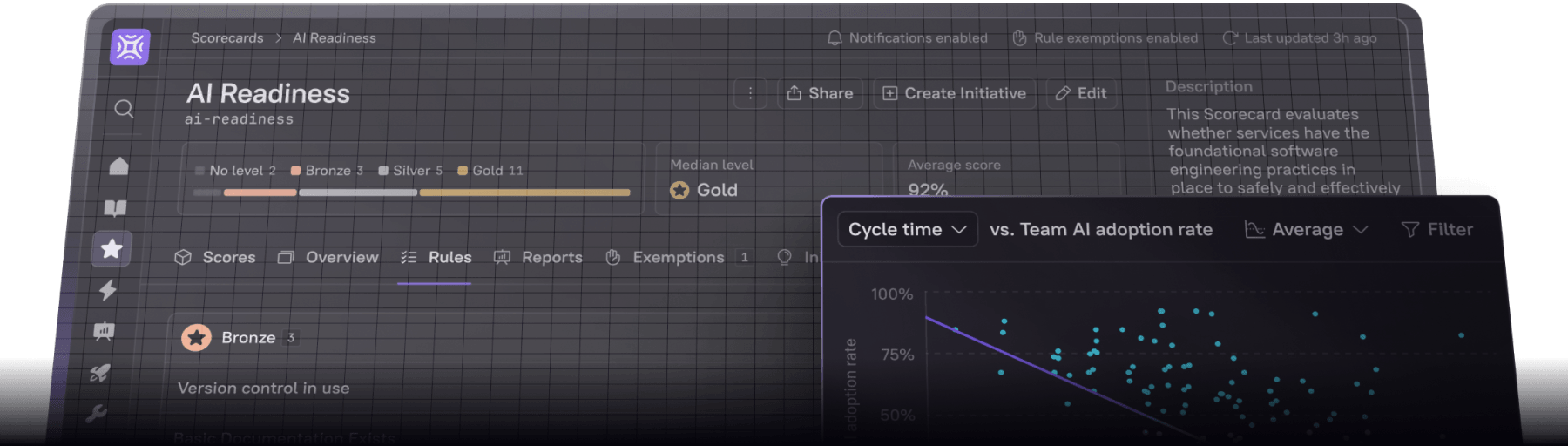
Set and enforce standards with Scorecards: Cortex goes beyond a catalog. Scorecards let you define the standards every service should meet, from production readiness to security, and Initiatives turn those gaps into tracked work and see it through to completion, with Jira tickets and Slack nudges along the way.
Keep your catalog data trustworthy: A catalog only works if people trust it, and a hand-maintained one drifts. Cortex discovers and maps your services automatically, predicts the most likely owner from repository activity, and re-checks ownership on a schedule, so the data stays current without every team babysitting a YAML file.
See the health of your whole organization: Open-source Backstage provides a catalog, but on its own it can't tell you about the health of your engineering organization. Cortex has an Engineering Intelligence platform built in, so leaders can track DORA metrics, find bottlenecks, and measure team performance without building custom plugins or buying a separate tool.
Govern AI as it scales: As AI assistants generate more code, Cortex keeps it governed. AI Readiness Scorecards hold every service to the standards an agent needs to work against, the Context Graph and Cortex MCP give assistants reliable context about your systems, and the AI Impact Dashboard ties tool usage to delivery metrics so you can see whether AI is helping.
Build what's unique to you: Buying Cortex does not put your platform team out of work. Your team keeps building on Cortex: custom plugins, Workflows for scaffolding and day-two operations, and agents that use your catalog through Cortex MCP. Cortex runs the catalog, the integrations, and the infrastructure underneath, so your engineers spend their time on the tools that are unique to your organization instead of maintaining the platform itself.
Migrate from Backstage in weeks: Keep the work you've already done. Our Backstage Migration Helper ingests your existing YAML files, so you can run Cortex alongside Backstage, confirm the data, and cut over in weeks rather than starting from scratch.
To get started with Cortex, book a demo.
Backstage vs. Cortex at a glance
Frequently asked questions
Is Backstage free?
Yes. Backstage is open-source and free to use. The main Backstage cost is the engineering team you need to build, run, and maintain it.
How long does Backstage take to set up?
A basic instance comes up quickly, but a production-ready portal with integrations, auth, and a populated catalog is a multi-month project, and larger enterprise rollouts have been reported to take a year or more.
Can I migrate from Backstage to Cortex?
Yes. Cortex imports your existing Backstage catalog YAML and maps it to the Cortex data model. Most teams run both in parallel for two to four weeks to confirm data parity, then cut over, with a typical timeline of four to eight weeks.
Does Backstage include scorecards or engineering intelligence?
Open-source Backstage does not. Scorecard, maturity, and engineering-intelligence functionality comes from third-party or commercial add-ons such as Soundcheck.
Is Backstage still actively maintained?
Yes. Backstage is a CNCF project with regular releases.
Last updated: October 2026